Mobile Forensics
Private Browsing Artifacts in Mobile Forensics
Private browsing may hide ordinary browser history, but mobile forensic review can involve a much broader set of artifacts.
Introduction
Most smartphone users are familiar with private browsing. On iPhones, it is called Private Browsing when using Safari. While most users know it in Chrome as Incognito Mode.
The idea seems simple enough: open a new window, browse the web, close the tab, then the activity will be erased and disappear.
At least, that is what will happen with regular browser history.
In mobile forensics, though, this distinction is important. “Invisible” does not necessarily mean “not there”.
That distinction is significant because of misconceptions regarding private browsing. Most people believe it acts as a secure delete button or some kind of method that deletes everything.
That is far from the case.
Instead, private browsing reduces or removes certain pieces of data from normal storage. It hides them from normal browsing history or from easy visibility, but doesn't guarantee that they won't get into some kind of record in the first place.
What Private Browsing Really Removes
Depending on the browser or the OS, the list may vary, but generally includes:
- Browsing history
- Search history
- Form entries
- Certain cookies
- Part of the cached data
- Closed tabs with private browsing sessions
From the user’s perspective, the browsing session appears to disappear once the tab is closed, but a forensics examiner is concerned with a different question:
Does this activity result in any artifacts created by the phone?
And sometimes the answer is yes.
Full File System Extractions Are Important for Mobile Forensics
Mobile forensics is all about depth.
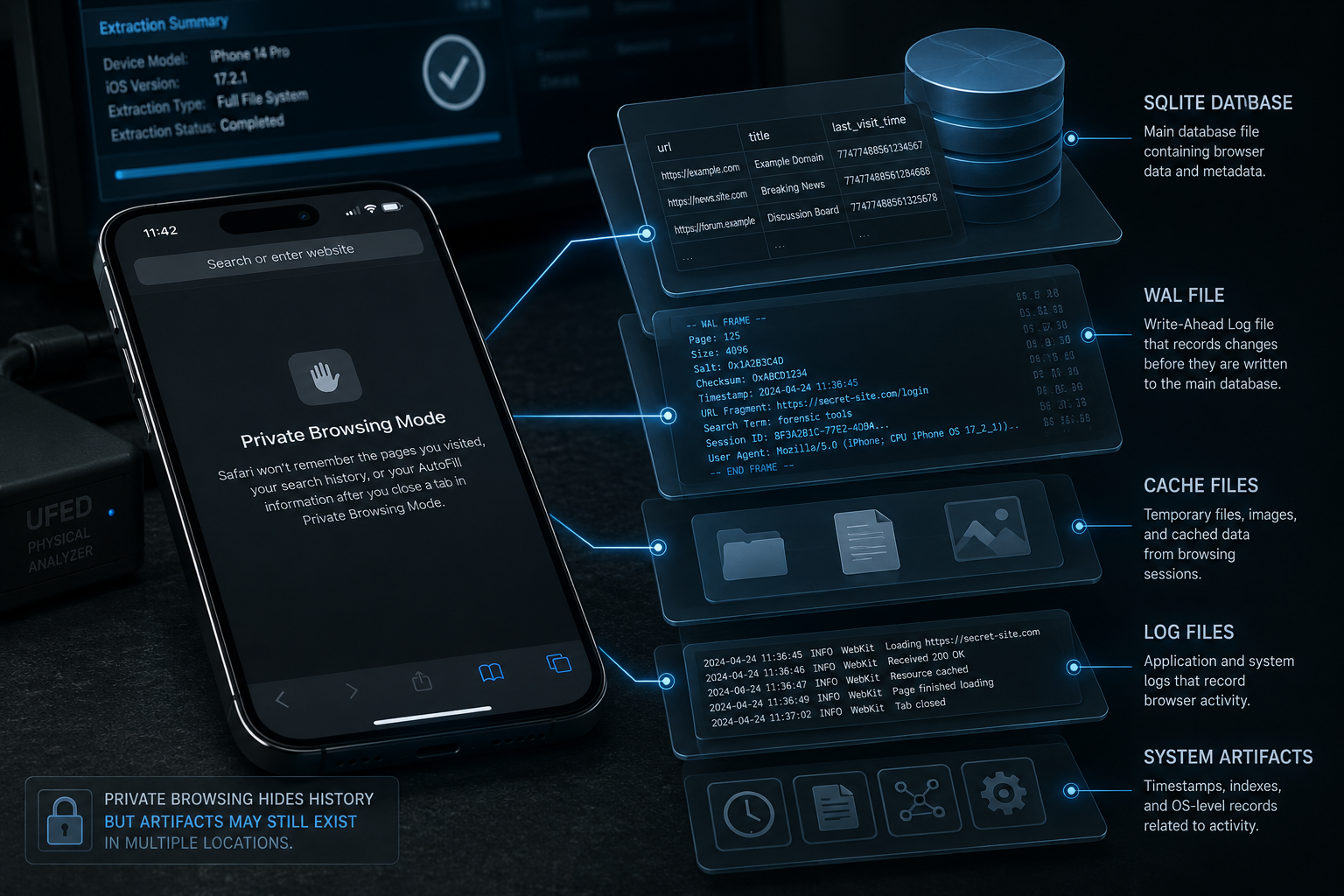
With full file system extractions (FFS extractions), a forensic analyst will be able to access files from application folders, database, log files, cache, and other sources.
While reviewing private browsing sessions, these sources include:
- Data of the browser application
- Databases of the browser
- WAL files of databases
- Cached files of browsing
- Temporary files
- Sessions
- Downloads and downloading history
- Logs
- System artifacts related to the browser operation
All of this data is not visible to the user normally, but is accessible for forensics.
Why WAL Files Are Important for Mobile Forensics
Many smartphone applications use SQLite databases as a basis for working with various data sets. These databases often have additional files to back them up, called write ahead log files or WAL files.
Without diving too deep into technicalities, the importance of WAL files lies in their function: they temporarily store the information that has not yet been fully processed or applied to the main database yet.
As a result, even after erasing certain information from the main database, some of it can be left in its WAL file.
Depending on the device, OS version, and particular application, this information can include timestamps, fragments of browsing, session information, partially erased data, or similar.
Once again, there is no guarantee of recovery based on private browsing alone, as this data depends greatly on the OS version and device model, browser being used, age of information etc.
Why Time Is Critical for Artifacts
One thing in mobile forensics is critical for successful data acquisition: time.
After the event occurs, the likelihood of recovering artifacts generally decreases as more time passes and the device continues to be used. Cache gets updated or purged, temporary files are overwritten and deleted, log files get rotated, browser databases are altered.
Every moment spent using the device after the event happens diminishes chances of successful data recovery.
Some of the things that a device can do with your browsing history in the meanwhile:
- Cache files will be purged
- Temporary files will be overwritten
- Browser databases will be modified
- Logs will get rotated
- Session data will be updated and possibly purged
- Artifacts will become outdated and may disappear
Artifacts May Still Exist Even After Private Browsing
Not only are browser artifacts subject to change over time, but browser history isn't the only source where they may be hidden.
Since modern smartphones interact with many different applications, clouds, messages, notifications, photos, files, or media, a private browsing session may create artifacts in other apps on the device.
For example:
- Downloaded files
- Screenshots in the photo library
- Copied links as part of clipboard artifacts
- Website logins that cause account activities
- Open documents in another app
- Notifications or previewed pages that caused related artifacts
So private browsing will hide browser history, but not necessarily anything else on the device.
Data Recovery in Private Browsing Is Possible, but Not Guaranteed
One more important point about mobile forensics is that successful recovery can rarely be guaranteed.
Due to encryption, auto deletion, overwriting, and other measures, much of the data on a modern device may not be recoverable or accessible at all. Whether private browsing artifacts will still be found depends on many factors, such as:
- Model and make of the device
- Operating system version
- Browser used and browser version
- Whether the private browsing tabs were still open
- Whether the device had a reboot
- Encryption state of the device
- How much time had passed
- How actively the device had been used
- Method of data extraction
- Forensic tools and methods
There is simply no definite answer here. One can never guarantee the results of mobile forensics.
Final Thoughts
Private browsing sessions can protect regular history from unwanted attention. For the user, it is just like deleting something. However, a forensics analyst will be interested in more details.
Depending on the extraction method available, private browsing artifacts can still appear in browser databases, WAL files, cache, log files, downloads or other data sources.
In mobile forensics, what is visible on the screen is only a small part of the story.